
TikTok
https://v.douyin.com/pEQJdMtMQrY/
https://v.douyin.com/4qeT_eVkWzs/
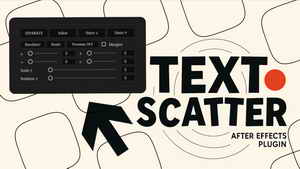
Quickly split text into words, randomize them, and organize layers with one click.
Text Scatter is a simple yet powerful tool for Adobe After Effects that lets you instantly split text into words and turn them into individual layers. Once separated, you can randomize their order or organize them into clean layouts
Separate & Random Functions
The Separate feature instantly splits any text layer into individual words or characters, giving you full control over each element.
Once separated, the Random function lets you rearrange their order with a single click.
Perfect for creating dynamic layouts, scattered motion effects, or eye-catching text animations in seconds.
Why use Text Scatter?
Perfect for motion designers, editors, and creators who need fast, flexible, and dynamic text layouts
— all without complex setups or time-consuming adjustments.
Works seamlessly with any font or language, and includes a non-destructive workflow with a Reset button to instantly restore your layout.
The Separate action converts words into individual layers and does not preserve their exact, pixel-perfect positions.
If you need exact placement retention, consider tools specialized in that.
Size:1.71 MB
home page
https://aescripts.com/text-scatter/
Free Download:
Aescripts Text Scatter v1
链接: https://pan.baidu.com/s/1HG1KmUfY4y-YEEb-wra5DA?pwd=3unq
提取码: 3unq
Pterosaurae » Free Download:Aescripts Text Scatter v1
